Saturday, February 27, 2010

Material Traps Light Cheaper than solar cells


The flexible composite requires far less silicon than today's solar cells.

A new photovoltaic material performs as well as the one found in today's best solar cells, but promises to be significantly cheaper. The material, created by researchers at Caltech, consists of a flexible array of light-absorbing silicon microwires and light-reflecting metal nanoparticles embedded in a polymer.
Light trap: Very little light can escape from this flexible array of silicon microwires embedded in a rubbery substrate. 
Credit: M. Kelzenberg
Computational models suggest that the material could be used to make solar cells that would convert 15 to 20 percent of the energy in sunlight into electricity--on par with existing high-performance silicon cells. But the material would require just 1 percent of the materials used today, potentially leading to a dramatic decrease in costs. The researchers were led by Harry Atwater, professor of applied physics and materials science at Caltech.
The key to the new material's performance is its ability to trap light. The longer a photon bounces around inside the active part of any solar cell, the greater the chance it will dislodge an electron. All high-performance solar cells have antireflective coatings that help trap light. But these cells use require far more silicon and must be sawed from wafers, a wasteful process.
"The promise of light trapping has always been that you could use less silicon and bring the costs down, but it's been difficult to implement," says Eli Yablanovitch, professor of electrical engineering at the University of California, Berkeley, who was not involved with the research.
Many groups have turned to structures such as nanowires and microwires in an effort to solve this problem. The Caltech group's photovoltaic material, which uses silicon microwires, demonstrates a new level of performance largely due to the addition of reflective nanoparticles.

The Helping Hand Restores the Functionality of a Paralyzed Upper Limb

The Helping Hand Restores the Functionality of a Paralyzed Upper Limb

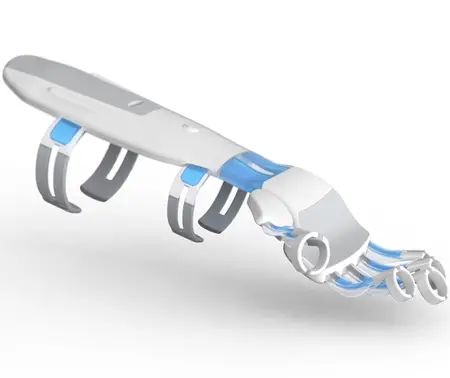
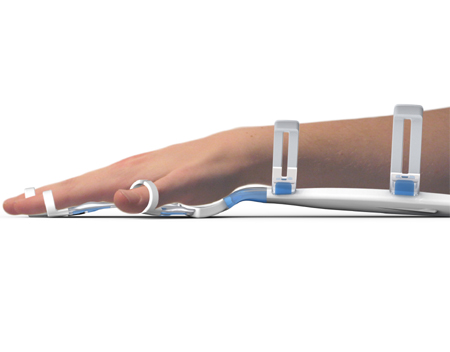
The helping hand is an innovative concept device that can efficiently help a person who has lost functionality of his or her upper limp due to a stroke by effectively regaining control over the paralyzed arm or hand. By wearing it, the motionless limb can do everyday tasks like holding objects, eating, dressing and even writing. The technology is to transmitting signals from the human brain through a neuro-implant to control the device, which allows the user to move their hands, arms or fingers by simply thinking of any action. The electroactive polymer joints of the device make the movement of the limb more natural and friendly for the user. The straps are designed to take their positions automatically when the device is turned on. Moreover, the device gives user the option of putting on and taking off whenever they want by using one hand only.

the helping hand
the helping hand
the helping hand

Wednesday, February 17, 2010

Five Free Distributed Computing Projects for your Idle PC!


Five Free Distributed Computing Projects for your Idle PC!


Distributed computing is one of the wonderful ways that you can use your PC to contribute to more thoughtful, worldly causes than keeping your room warm during a cloudy summer day. These projects, made up of members from all corners of the world (even Maximum PC's own forums), make use of your computer during its idle periods. Whether they're come as a screensaver that launches after a set period of time, or a background application that launches after a certain period of CPU inactivity, these free applications divvy out the tasks of a large, complicated project to a number of people at once.
Why should you care? Because distributed computing is a nice way to use a minimal amount of your system's resources--resources that you wouldn't be using anyway--to contribute to something greater than yourself. It's entirely altruistic in its purpose. Very, very few distributed computing projects have some kind of monetary award attached to the work, and you'd have to score a major knock-out in your individual contribution to the project to see the result. That is, your computer would have to be the one that finds the next huge prime number, or major breakthrough in protein analysis, or something to that effect. If you're in it for a reward, you might as well develop a program that estimates lottery odds.
You'll find that entities like Maximum PC, amongst others, have teams of people contributing to these distributed computing projects. It's a great way to make friends and fellow geeks--in fact, I'd probably be strung up by this site's forum folk if I didn't include a shout-out to their work on the Folding@Home project. +10 Light Side points for you.

Folding@home

What it is: Stanford University says it best. "Proteins are biology's workhorses -- its "nanomachines." Before proteins can carry out these important functions, they assemble themselves, or "fold." The process of protein folding, while critical and fundamental to virtually all of biology, in many ways remains a mystery.
Moreover, when proteins do not fold correctly (i.e. "misfold"), there can be serious consequences, including many well known diseases, such as Alzheimer's, Mad Cow (BSE), CJD, ALS, Huntington's, Parkinson's disease, and many Cancers and cancer-related syndromes."
Your goal? Use your computer to fold proteins (as a part of Maximum PC's team, if you so desire). You can set the program to use as much or as little of your CPU as you desire, and you can even download versions of Folding@home that make use of your GPU as well. Crazy, high-performance stuff--for a good cause, of course.
Download it here!

Climateprediction.net

 
What it is: Unlike chaos theory's Butterfly Effect, popularized by the speculation that the beating of a butterfly's wings could trigger a tornado in a distant location on the Earth, Climateprediction.net has nothing to do with trying to plot out storm predictions or anything super-fun like that. Instead, the program helps scientists gain a deeper understanding of the variables that affect future climate change. You're helping them to run the subtle tweaks in their experiments on a grand scale, improving the ability of these complex projections to accurately reflect future possibilities.
Still, no tornados.
Download it here!

GIMPS

What it is: You're too late to earn the $100,000 cash prize, but the Electronic Frontier Foundation still has other monetary rewards up for grabs. The catch? You have to be the person that helps discover prime numbers with exceedingly large numbers of digits in them. Give 'er a shot as part of the GIMPS distributed computing network--many, many computers all contributing to the goal of finding increasingly larger prime numbers. How large? The $100,000 winner's 3.0 GHz Intel Core 2 Duo-based PC took 29 days to run the calculations on the 12,837,064-digit prime number. That's quite a hefty number.
Download it here!

SETI@home

What it is: Insert your favorite science-fiction theme here. SETI@home is a distributed computing project that uses the computers of many to help scan the stars for signs of extraterrestrial life. Although it's not your computer that's doing the star-searching per se. Rather, you're merely helping to analyze the data that's already been collected by radio telescopes. Who knows--you could be the one to start a war with an intergalactic species!
Download it here!

Muon1

What it is: Ever feel like turning your PC into a particle accelerator? That's one mighty overclock. Sadly, you won't be crashing real atoms into each other as part of the Muon1 project. However, you will be helping to run simulations of the following scenario: "You are simulating the part of the process where the proton beam hits the target rod and causes pions to be emitted, which decay into muons. These would then proceed to a storage ring and decay into electrons and the neutrinos that are used for experiments. "
But don't think that you're just doing this for the heck of it. The results of the distributed computing effort will affect the chances of funding for the project's ultimate goal: firing particles through Earth's interior, then measuring the changes to determine a neutrino's mass.
Just try not to create any black holes, eh?
Download it here!


List of distributed computing projects:

Monday, February 8, 2010

Digital Note Taker

Note Taker:


Enables the use of digital ink features and utilities in Windows VISTA™ and Office® 2007


 Tablet NoteTaker and Tablet Mobile NoteTaker work seamlessly with Windows Vista™ and Microsoft Office® 2007 digital ink features and utilities

 Compatible with Microsoft’s handwriting recognition and other digital ink utilities available in Outlook®, Word®, Excel®, PowerPoint®, OneNote®, Visio®, and Journal

 Low-cost digital pen lets users write on plain paper with a cordless, standard-size pen, simultaneously creating a digital ink copy of anything they write - without using a digitizing surface

 Unique mouse functionality - switch between Writing-on-Paper Mode (standard ink ball-pen) and Pen-Tablet-Mode (pen's hovering and mouse functionality writes directly into Windows and Office applications)

 Transforms most computers working under Windows Vista, to fully-functional Tablet PC compatibles

 Designed to operate Bluetooth or RF communications to PCs, portable computing devices, or cellular phones (optional)


Digital Ink in Windows Vista™ Microsoft’s new Windows operating system will deliver a computing experience that is faster, easier, and more efficient. Windows Vista™ is fundamentally designed to allow users to get better results in less time. Windows Vista™ introduces extensive support for pen and touch input. Note Taking

Microsoft Journal provides an intuitive set of tools that enables pen users to naturally enter and gather information that can then be easily located using the powerful search function. Journal tools include a choice of pens, markers, and highlighters, a selection lasso, and a flag tool.

Handwriting Recognition Windows Vista™ introduces intelligent recognition as a natural supplement to keyboard input. This new recognition technology efficiently and accurately converts a wide variety of handwriting styles into typed text. Handwriting can be used to quickly enter information anywhere that the computer accepts typed input. Handwriting input panel showing writing and recognized text Digital Ink in Office® 2007 Microsoft Office® 2007 takes advantage of the innovate pen support offered by Windows Vista™ to provide a consistent set of inking options that are available to pen users in all of the most frequently used Office applications. These inking options are found on the Review tab within each application and provide the ability to intuitively make notes, diagrams, and highlights. Specific inking tools can be added to the Quick Access Toolbar located at the top of each application to keep the most commonly used tools handy at all times. In Word, pen users also have the ability to insert handwritten notes referred to as Ink Comments. In all applications, pen users have the option of entering text using handwriting recognition in any field or area that accepts keyboard input. Digital Ink Implementation - Office® 2007 Applications
Digital ink in Word®
Annotations to emphasize key data in Excel® spreadsheets

Friday, January 22, 2010

Hidden asteroids are stalking the Earth

Hidden asteroids are stalking the Earth  :


TINY asteroid that buzzed Earth last week highlighted our planet's vulnerability to objects whose peculiar orbits put them in a game of hide-and-seek with us.

An Earth-based telescope spotted the 10-metre space rock hurtling our way just three days before a near miss on 13 January, when it flew by at just one-third of the distance to the moon . The asteroid is never expected to hit Earth and would burn up before hitting the ground in any case. But its unusual orbit seems ingeniously designed to evade our surveys. It is likely that a handful of objects large enough to cause harm are hiding under similar circumstances.

Large asteroids are relatively easy to spot because they reflect the most sunlight. But smaller asteroids - which can still damage Earth if they span at least 30 to 50 metres - are usually too dim for telescopes to detect except during brief close approaches to Earth. For a typical near-Earth asteroid, these occurrences are a few years or decades apart.

However, last week's unexpected visitor, called 2010 AL30, kept far enough from Earth to be invisible for more than a century. The prolonged avoidance occurred because the period of its solar orbit was 366 days - very close to Earth's year (though the close pass shifted the space rock into a 390-day orbit). Like a slightly slower race car that is periodically lapped by its competitor on a circular track, it stays far from Earth for long stretches.

"2010 AL30 may become a sort of 'poster child' for hiding asteroids," says Alan Harris of the Space Science Institute in Boulder, Colorado.

Similar "synchronised" asteroids may be hiding with periods of very close to two, three, four years and so on, Harris says. Those with periods of about four years pose the greatest risk to Earth, because they would be in sync with both Earth and Jupiter, says Timothy Spahr of the Minor Planet Center in Cambridge, Massachusetts. Such asteroids would be particularly influenced by Jupiter's gravity, which could nudge them onto a collision course with Earth.

Asteroids with non-synchronous orbits can also hide. Those with orbits mostly interior to Earth's - called Aten asteroids - spend most of their time in the glare of the sun as seen from Earth, so telescopes have trouble spotting them.

Despite our best efforts, the majority of hidden asteroids are too small and dim to be detected until they are practically on top of us - regardless of their orbits. "The sad part is, the bulk of the population is invisible to us most of the time," Spahr says.

Tuesday, January 12, 2010

RC heli with streaming video & iPhone control

RC heli with streaming video & iPhone control:

The recently announced AR.Drone from Parrot may be the coolest toy I've ever seen. The AR.Drone quadricopter is controlled by iPhone & iPod Touch via wifi and provides a live video stream from the unit's 'cockpit'. It uses a second onboard cam facing downward to measure speed and compensate for turbulence, and in case of signal loss an autopilot control kicks in to handle landing. The unit is billed primarily as an augmented reality system for gaming, but looks like it'd be a ton of fun without any virtual goals. Parrot also offers an SDK for those interested in making applications for use with the AR.Drone. Look forward to seeing what devs come up with!


Friday, January 8, 2010

Google Nexus One Phone

Google Nexus One Phone


Google has unveiled their brand phone, the Google Nexus One($529 unlocked; $180 with a T-Mobile 2 years contract).
The Nexus one phone made by HTC, using Google's latest version of the Android operating system - Android OS 2.1, sports a 1GHz Qualcomm Snapdragon processor, features a 3.7 inch AMOLED touchscreen(480 x 800), a 5 megapixel camera with a built in LED flash, Wi-Fi connectivity, accelerometer, compass, GPS, stereo Bluetooth, and 3.5mm headphone jack. Other features include a trackball with a multicolor LED that displays different colors for different notifications


Monday, December 7, 2009

Researchers discover single-atom transistor

Researchers discover single-atom transistor:


In an age ruled by information great emphasis is placed on processing speed, memory capacity and sensor sizes. The advancement of such hardware is tied directly to the accelerated development of integrated circuits and exponential improvements of the transistor. When news hits that researchers successfully built a working transistor the size of a single atom, the next generation of devices don't seem that far-fetched.

Sunday, November 29, 2009

Robotic Ant

Robotic Ant:

A-Pod is an ant inspired hexapod robot with a 2 DOF abdomen (tail), a 3 DOF head with large mandibles. 6 legs with 3 DOF each. Total 25 servos.


DancePants

Dancepants

Dancepants Kinetic Music Player designed by Lithuanian designers Inesa Malafej and Arunas Sukarevicius. It is a brilliant and simple concept, using kinetic energy to generate the power for MP3 player while you running and dancing. The kinetic module is attached at the pants leg with a connection running along the leg up to a pocket where the MP3 player is connected.
"it is a 100% interactive way to feel the value of energy on your own . During the movement of feet, kinetic energy is collected to play music. The inverse dynamism of "Dancepants" motivates you to move your feet in order to hear your beloved music. And as long as you keep running or dancing you can be sure you won’t run out of battery. "

Site Search